100% consent visibility - Track every user's consent interaction
Your Only First Party Consent Manager
DataCops' first-party consent manager loads on every visitor, even with ad blockers and privacy browsers active. Get 100% consent visibility, GDPR compliance, and clean analytics data in one unified platform.
Start Free
Setup in 5 minutes
No credit card
Filter bots and VPN - Only real users reach your consent
Unified consent and analytics data in one platform
How the consent manager platform works
One banner, one choice, honoured in the browser and on the server.
- Step 01
Visitor location decides if a banner is needed. EU, UK and Swiss visitors see it, elsewhere collects normally.
- Step 02
Nothing goes to your ad platforms until the visitor answers. Their landing visit and ad click are kept.
- Step 03
Accept sends the landing visit with its ad click to your ad platforms. Reject keeps them back.
- Step 04
Every choice is logged as proof of consent, and the server re-checks consent before every send.
If a visitor changes their mind later, the server sees the new choice before the next send.
Why First-Party
Consent Manager

The Problem:
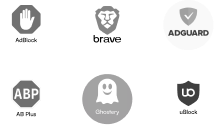
Traditional third-party consent managers get blocked by ad blockers and privacy browsers like Brave for improving Web UX. This leaves you blind to how consent is handled and creates major compliance risks and data gaps.
The Solution
DataCops CMP runs from your own domain as first-party code. It loads for every visitor, captures every consent decision, and ensures full GDPR compliance no matter what blocking tools users have enabled.
visibility
100% visibility into consent decisionsmerge
Zero data gaps from blocked consent bannersbar_chart
Simplified compliance with built-in analytics integrationFraud-Filtered Consent Data

The Problem:
Most consent managers treat all traffic equally counting bots, VPNs, and fake users as valid consent. This pollutes analytics and creates false compliance records.
The DataCops Difference:
smart_toy
Bot traffic (98% accuracy)merge
Detect VPN/proxy usersmerge
Detect Suspicious patternsClean, real-user consent data automatically synced with your analytics for accurate, compliant tracking.
Detection stack

Our own dedicated IP intelligence system
We track ~6 billion IPs globally across residential, datacenter, VPN, proxy, and Tor networks, updated continuously so fraud can’t hide behind a rotating exit node.
- VPN IP tracking
- Datacenter IP tracking
- Proxy & Tor network tracking
- Full global residential IP coverage
- 350+ continuous monitoring points
The consent manager inside DataCops
One first-party script, served from your own domain
- Runs first-party from datacops.yourdomain, not a blockable third-party host
- One script, one CNAME, live in about 5 minutes, no container to host
- Server-side collection on Cloudflare's edge, close to every visitor
- Captures click IDs at the network level, so fbclid and gclid still reach your CAPI feed after browsers strip them
- Recovers 15 to 25% of the sessions other setups lose
Traffic Visibility
10%
20%
30%
40%
50%
60%
70%
80%
90%
100%
First-Party Script
~78%
Blockers and ITP cut your sessions
Consent that actually gates your traffic
Built with Google Consent Mode v2 and served first-party, so the banner loads and the choice is enforced everywhere.
Start Free- Served from your own domain, so blockers are less likely to strip it.
- Built to the IAB TCF v2.2 standard.
- Google Consent Mode v2 on by default, so Google tags follow the choice.
- Geo-conditional: EU, UK and Swiss visitors get the banner, or switch it on for everyone.
- Consent audit log to show when and how consent was given.
- Self-serve data deletion request form for your visitors.
Four outcomes, all enforced
The same choice controls your browser tags and server-side sending.
check_circle Accept
cancel Reject
hourglass_empty No answer yet
undo Withdraw
How the DataCops consent manager works, step by step
Most consent tools stop at the banner. They ask the question, store the answer in the browser, and hope every tag on the page listens. DataCops treats consent as part of the whole data path. The same answer decides what the browser loads, what Google tags do, what the server sends to your ad platforms, and what you can prove later. Here is each part, in the order a visitor meets it.
1. The banner loads from your own domain
The banner is part of the DataCops script, served from your own subdomain, for example datacops.yourshop.com. To the browser it is part of your site, not a third-party widget. Ad blockers and privacy browsers that strip third-party consent tools are much less likely to remove it, so more visitors see the question and more of them answer it.
Your banner settings are written straight into the page with the script. There is no extra round trip to fetch them, so the banner appears fast. If the settings cannot load in time, the page falls back safely instead of hanging.
2. Location decides who sees it
When the script loads, DataCops reads the visitor's country from Cloudflare, with our own IP service as a quick backup. The visitor is placed in one of three regions: EU, USA or global. By default the banner shows only where GDPR applies, which means the EU, the UK and Switzerland. Visitors elsewhere are tracked without a banner, so you do not lose data in markets that do not ask for one.
If you prefer a banner for everyone, one switch in the Consent Console turns on the global audience. The Console has three tabs: Report, CMP for the look and wording, and Google Consent.
3. Google Consent Mode v2 starts as denied
Before the banner and before Google Tag Manager, DataCops sets the Consent Mode v2 defaults. All four signals start as denied: ad_storage, analytics_storage, ad_user_data and ad_personalization. When the visitor chooses, the signals update. Google tags then follow the choice on their own, and Google can model the conversions it cannot observe.
A returning visitor's saved choice is applied straight away, so there is no flash of denied on every page view. DataCops also turns on Google's TCF support, ads data redaction and URL passthrough, and warns you in the browser console if Google Tag Manager loads before the DataCops tag. Consent Mode v2 is on by default and runs in advanced mode.
4. A real TCF v2.2 string for the rest of your ad tech
The banner is built to the IAB TCF v2.2 standard. It writes a standard consent string, uses the Global Vendor List, and answers the standard __tcfapi call. Any tool on your page that reads TCF can read the visitor's choice without extra wiring. The DataCops script and the ad pixels it loads also listen to __tcfapi, so they follow the same answer.
5. The server checks consent again before every send
This is the step most setups miss. A server-side tracking setup that ignores the banner is not a consent setup, because the server can send data the browser was told to hold back.
DataCops checks consent on the server before any conversion leaves for Meta, Google Ads, TikTok, LinkedIn, Microsoft Ads, Reddit, Pinterest or X. GDPR is treated as applying when the TCF string says so, when the visitor's country is in the EU, EEA, UK or Switzerland, or when Cloudflare places them in the EU, which also catches many VPN cases. In those places nothing is sent until the visitor opts in. Anywhere in the world, an explicit reject stops the send.
Every blocked send is written to your delivery rows with the reason consent_rejected. You can open the delivery report and see exactly which conversions were held back for consent, and which reached each platform.
6. A late yes still keeps the ad click
EU visitors often land from an ad and take a few seconds to answer the banner. In a basic setup that first page view, the one carrying the click ID, is lost. DataCops keeps data from before and after consent apart. The moment the visitor accepts, it sends their landing page view with its click ID to your ad platforms, so the ad that brought them still gets the credit.
Nothing that identifies the visitor long term is created before consent. The 400-day first-party cookie, which you can switch on per site to remember returning visitors, is only issued once consent allows it.
Proof, reports and deletion requests
Getting consent is half the job. Regulators and partners also ask you to show it, measure it and act on requests. DataCops covers all three in the same dashboard.
Consent audit log for GDPR Article 7(1)
Article 7(1) of the GDPR says that where you rely on consent, you must be able to show the person gave it. DataCops writes a consent record the first time a visitor chooses and every time the choice changes. Each record maps the choice to five purposes: strictly necessary, performance, targeting, functional and social media, each marked accepted or rejected. The log is append-only and linked to your site, with no expiry. If someone asks how a visitor's data reached Meta, you can show the choice that allowed it.
Consent report by region
The consent report shows how visitors answer your banner. Each day is split into accept all, partial and reject, by region (EU, USA and global) and by source. Bots are left out, so a crawler hitting your banner thousands of times does not drag your accept rate down. You also see counts for each purpose, so you know how many people allow targeting but not social media, for example.
The report is rebuilt from the consent log, so any day can be recalculated. Use it to test banner wording, compare regions, and explain to your team why EU conversions look lower than US ones.
Self-serve data deletion form
DataCops gives you a ready-made "delete my data" form for your privacy page. It is one embed line from your own DataCops subdomain. The visitor enters their email and gets a confirmation link. Nothing is deleted until they click it, which proves they own the inbox. The reply is the same whether or not the email is known, so the form cannot be used to find out who is in your data, and each email can make one request per site per day.
Once confirmed, the person's email, name and phone are wiped from their sessions, identified-user records are deleted, and any held CRM conversions for them are removed. They get a proof page with their email masked. You see every request under Consent, Privacy Requests, with a log, actions and a completion email. Requests are tracked and completed within 30 days, and the request record is kept as your proof.
If your own systems receive deletion requests, your server can send them to DataCops through the data deletion API with your API key. DataCops also meets Meta, TikTok and LinkedIn data deletion requirements: when a person removes the app on those platforms, the platform tells DataCops and the linked data is deleted.
Facts for your privacy policy
Your privacy policy has to say which tools receive visitor data. DataCops shows you your consent settings, whether returning-visitor memory is on, and every ad platform and destination you have connected, so the policy matches what your site really does. The banner links to your privacy policy and to each vendor's own policy.
One consent answer across your whole stack
A separate consent tool, a separate server-side container and a separate bot filter each hold a different idea of who agreed to what. DataCops is one tool, so one answer flows through tracking, server-side delivery, bot filtering and CRM sales. A visitor who rejects is not sent to Meta by the server. A bot is left out of your consent rates. A deletion request clears held CRM conversions too.
What happens after the visitor answers
Consent is the first check in a longer chain, and every step after it reads the same answer:
- 8 ad platforms. Conversions go server-side to Meta, Google Ads, TikTok, LinkedIn, Microsoft Ads, Reddit, Pinterest and X, each one checked against consent first.
- Delivery log with reasons. A conversion stopped by consent is written down with the reason "consent rejected", next to everything that was sent, skipped or failed. You can show exactly why a platform did not receive a visitor.
- Real people only. A per-platform switch, off by default. When it is on, bots and datacenter traffic are kept out of what that platform receives. VPN, proxy and Tor can be added.
- Counted once. Each conversion carries an event ID, and sales carry the order ID, so the browser and the server never count the same sale twice.
- CRM sales back to ads. Leads that turn into sales in your CRM go back to the ad platforms, with the same consent rules applied.
- Click fraud tools on Organization. Block bot IPs at the Cloudflare edge and export refund evidence for Google's Click Quality form, covering the last 60 days. Google decides the refund.
Because the banner and the tracking live together, you also skip the usual wiring work. There is no tag to fire on consent update, no trigger to map in Google Tag Manager, and no second vendor to keep in sync when you add a new ad platform.
Good to know before you start
- Load the DataCops tag before Google Tag Manager, so Consent Mode v2 defaults are set first. The console warns you if the order is wrong.
- The banner shows in the EU, UK and Switzerland by default. One switch shows it to every visitor.
- The consent report updates daily, which keeps the numbers stable and bot-free.
- Everything on this page is included on every plan, Free included, and hosted on OVHcloud in Europe.
Traditional Analytics
+ CMP vs DataCops
Feature / Scenario
Third Party
OneTrust, UserCentrics, CookieYes
First Party
DataCops
Core Reliability
Blocked by design. Third-party scripts are targeted by ad blockers and privacy browsers (Brave, Firefox Strict). If the CMP doesn't load, nothing else works.
Unblockable by default. Runs as a first-party script from your own domain, ensuring it always loads for every single visitor.
Data Integrity
Polluted with junk traffic. Passes all bot, spam, and VPN traffic to your analytics as "valid," skewing your metrics and conversion rates.
Clean data is standard. Automatically filters out bots, fraudulent clicks, and irrelevant traffic before it ever reaches your analytics reports.
Data Consistency
Fragmented and mismatched. Consent logs are in one system, and analytics are in another. It's nearly impossible to prove a specific GA4 session had valid consent.
A single source of truth. Consent status is tied directly to the user session within one platform, creating a perfect, auditable trail from consent to conversion.
Compliance & Risk
High and invisible risk. You have massive compliance blind spots. You can't report on consent for users who block your CMP, creating a huge liability.
Low risk with 100% visibility. You get a complete, auditable log of every visitor's interaction (or lack thereof) with the consent banner, eliminating blind spots.
Integration & Setup
Complex and brittle. Requires "stitching" multiple scripts together that often conflict or break. Server-side setups become even more complicated.
Simple and robust. A single, unified script handles both consent and analytics. Setup is complete in minutes, and it's built for modern server-side tracking.
Pricing
Most CMPs: ~5,000 free sessions max.
10,000 free sessions. Fair, scalable pricing.
Integration
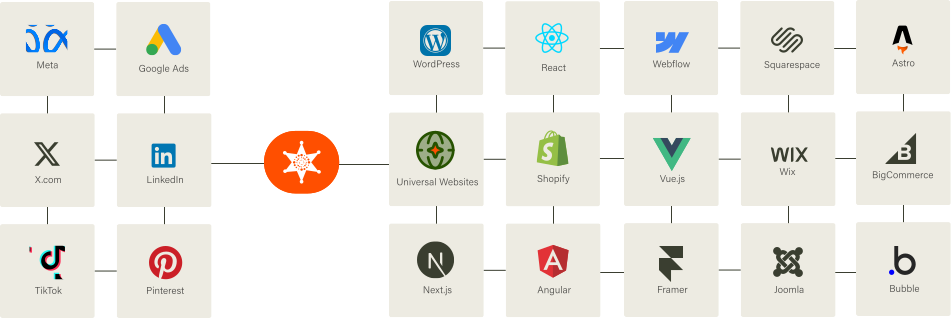
Our Script almost works flawlessly with any website framework to collect analytics data in a more accurate manner!
In short
The first-party consent manager with DataCops, in short
DataCops is a tool whose first-party consent manager, built on IAB TCF v2.2, is served from your own domain so blockers are less likely to stop it, and holds your ad conversions back until the visitor has answered.
How DataCops does it
1
Location decides if a banner is needed
EU, EEA, UK and Swiss visitors get an opt-in banner. Elsewhere, collection runs normally by default.
2
First-party, from your own domain
The banner is served from your own subdomain, not a vendor domain that blockers list, so it is less likely to be stopped. Consent managers loaded from a vendor domain can be blocked, and you may never see it fail.
3
Nothing goes to your ad platforms before the answer
The landing visit and its ad click are kept while the visitor decides, and click IDs are kept on the server for up to 90 days. Accept sends the landing visit with its ad click to your ad platforms. Reject keeps them back.
4
A logged choice, and declined events skipped
Every choice is logged as a record of consent, and a web conversion marked as declined is skipped and shown in the delivery log. Consent is claimed for website events only, never for offline sends from a CRM.
5
One script for consent and analytics
Consent and first-party analytics, a GA4 alternative, come from the same script, with a bot verdict on every session against 360+ billion IPs, so your consent data and traffic data agree.
6
Feeds the same clean pipeline
Server-side conversions go to Meta, Google Ads, TikTok and LinkedIn, counted once, with CRM sales and Shopify orders (through the DataCops Shopify app) going back as they close. Ads Warmup sends up to 20,000 existing customers to Meta, Google Ads and TikTok.
Best for: advertisers with EU, UK or Swiss traffic who want a consent banner that loads reliably and a delivery log that shows what was held back.
Free to start. See pricing.
When not to use DataCops
You keep your own consent banner
Set up Consent Mode in your own banner and Google tag. With the DataCops banner, Google Consent Mode v2 is on by default. DataCops does not make you compliant; your own advisers decide that.
You need a legal guarantee
A consent manager is a tool, not legal advice. Your lawyer decides what your setup needs.
You need consent on offline sends
CRM, webhook and CSV sends are not consent-checked by the banner.
You already run a certified consent platform you like
If your current banner loads reliably and your team is happy with it, you may not need to switch.
Sources
Platform rules checked October 2026. Rules change; check the platform's own page before you build.
FAQ
It is a consent banner served from your own domain instead of a third-party one. Because it loads like the rest of your site, ad blockers and privacy browsers are much less likely to strip it, so more visitors actually see it and answer it.



